

Proje ve kişiye göre Jira Worklog Report.
Jira'nın CSV dışa aktarımında proje ya da kişiye göre rapor yok. Dosyayı bırakın, gerçekten faturalandırdığınız toplamları alın.
Jira'nın "Export Excel CSV (all fields)" dosyası · yalnızca .csv
Ücretsiz · bağlantı ya da kurulum yok · dosyanız tarayıcıdan çıkmaz
- Faturalandırılabilir
Marcus Chen
Kestrel Robotics34,5 sa
- Faturalandırılabilir
Omar Wright
Anchorline Freight12 sa
- Faturalandırılamaz
Priya Patel
Internal6 sa
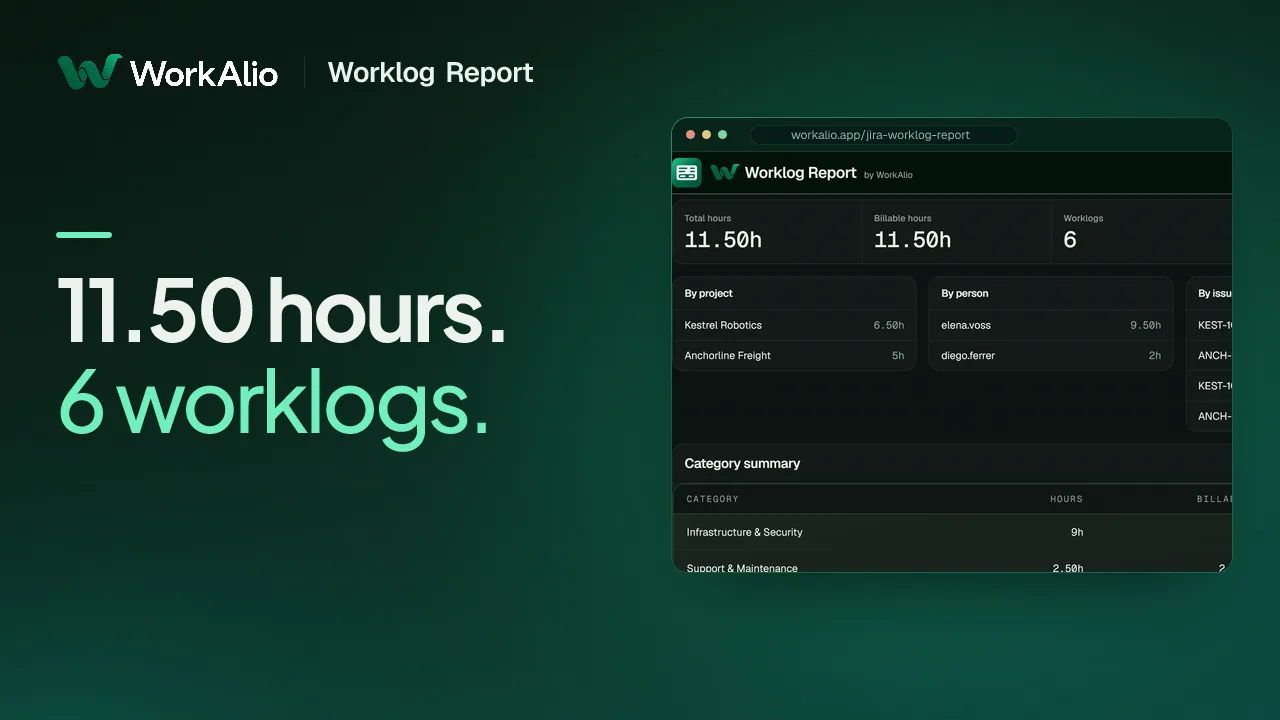
68 saniyelik videoda Worklog Report'un bir Jira dışa aktarımından proje ve kişiye göre toplamları nasıl çıkardığını izleyin.
Gerçek bir Jira mesai kaydı dışa aktarımı, gerçek üründe rapora dönüşüyor. İzlemek için ne hesap gerekir ne de dosya yüklemek.
 1:08
1:08Bir dakika sekiz saniye sürer. Anlatımlıdır, müzik ilk kareden başlar.
YouTube'a henüz hiçbir şey gönderilmedi: bu görsel ve metin bizden geliyor. Tarayıcınız ancak oynat düğmesine bastığınızda YouTube'a bağlanır. Video İngilizcedir; adımlar aşağıda Türkçe olarak yazılı.
- 0:03Jira süreyi kaydeder ama toplamaz.
- 0:08Log Work: tek başlık, iki sütun.
- 0:13Henüz kural yok
- 0:16Bu tarih sütunu hakkında bilmeniz gereken bir şey
- 0:19Bağlanacak bir şey yok. Kurulacak bir şey yok.
- 0:22Dosya açılır açılmaz toplamlar hazır.
- 0:26Projeye göre. Kişiye göre. İş öğesine göre.
- 0:30Aynı gün, iki kişi. Çakışma gösterilmez.
- 0:47İşin tarihi değil, kaydın gönderildiği tarih. Gizlenmiyor, açıkça yazıyor.
- 0:53Gerçekten fatura kestiğiniz toplamlar.
youtu.be/QVzz9hOMzmY · 24 Eylül 2026 tarihinde yayınlandı
Jira süreyi kaydeder ama toplamaz.
Her mesai kaydı bir tarih, bir süre ve bir iş öğesinden oluşur: doğru ve tek tek ayrıntılı, ama biri bir tablo açıp toplayana kadar faturalandırma için işe yaramaz. Atlassian bu raporu yapmayacağını açıkça söyledi.
20 yıllık yanıt
Atlassian isteği “Won't Fix” olarak kapattı
JRACLOUD-6137, “Generate worklog report”, 8 Mart 2005'te açıldı, 124 oy aldı ve 31 Temmuz 2014'te “Won't Fix” olarak kapatıldı. Gerekçe: “Bu özellik isteğinin önemini kabul ediyoruz, ancak buna geliştirme zamanı ayıramayacağız.” Kullanıcılar Marketplace'e yönlendirildi.
Asıl engel
Her Marketplace uygulamasının kurulması gerekir
Bu boşluğu dolduran uygulamaların hepsi (yılda 60 ile 5.210 dolar arası) müşterinin Jira'sına kurulmak zorunda. O rakama ihtiyaç duyan kişi ise genellikle fatura kestiği Jira'nın yöneticisi değildir; filtre çalıştırıp dışa aktarabilir ama uygulama kuramaz.
Açık hata
Dışa aktarım tarihi, işin yapıldığı tarih değil
JRACLOUD-77926 ve sunucu sürümündeki karşılığı JRASERVER-64025, 7 Şubat 2017'den beri açık: CSV dışa aktarımı, işin yapıldığı tarihi değil mesai kaydının gönderildiği tarihi verir. Dışa aktarımın tamamındaki toplamlar bundan etkilenmez; ama gün gün bir döküm, gerçekmiş gibi sunulan bir tahmin olurdu. Bu yüzden bu araç böyle bir döküm sunmaz.
Talep numaraları, oy sayıları ve tarihler jira.atlassian.com ve Atlassian'ın kendi destek belgeleriyle karşılaştırılarak doğrulandı.
Dosyayı bırakın, toplamları alın.
Jira'nın dışa aktardığı CSV
Issue key,Summary,Log Work
"PROJ-118","Client migration",
"comment;16/Sep/24;jsmith;7200"
Kurallarınızla eşleştirilir
PROJ-118 · 2h00m
Projeye göre eşleştirin
Faturaya hazır toplamlar
3 proje · toplam 52,5 sa, faturalandırılabilir 46,5 sa
Gerçek dışa aktarımı okur
Jira, bir iş öğesindeki her sprint, mesai kaydı ve etiket için sütun başlığını tekrarlar; basit bir ayrıştırıcı bunlardan yalnızca sonuncusunu tutar ve bunu fark ettirmez. Bu araç, tekrarlanan her sütunu ve Jira'nın comment;date;user;seconds düzeninde yazdığı her mesai satırını okur.
Proje, kişi ve iş öğesine göre toplamlar
Aynı süreler aynı anda üç şekilde gruplanır: müşteri faturası için projeye, bordro sorusu için kişiye, ayrıntılı döküm için iş öğesine göre.
Faturalandırma kurallarını siz yazarsınız
Bir kuralı projeye ya da iş öğesindeki bir anahtar kelimeye göre eşleştirin, faturalandırılabilir olup olmadığını seçin; tüm mesai kayıtları anında yeniden sıralanır. Calendar Timesheet'in kullandığı kural motorunun aynısı.
Üç adım; bağlantı da kurulum da yok.
Jira'dan dışa aktarın
İş öğesi gezgininde ihtiyacınız olan mesai kayıtlarını bir JQL filtresiyle bulun, ardından Export → Export Excel CSV (all fields) seçeneğini kullanın. Arama yapabilen her Jira kullanıcısı bunu yapabilir, yönetici yetkisi gerekmez.
CSV'yi bırakın
Dosya tarayıcı sekmenizde okunur. Hiçbir şey yüklenmez; fatura kestiğiniz Jira'ya da bir şey kurmanız gerekmez.
Gözden geçirin ve dışa aktarın
Toplamları kontrol edin, faturalandırma kurallarını belirleyin ve Jira'nın kendi sütunlarıyla değil, müşteri faturasına ya da bordro sorusuna uygun biçimde hazırlanmış bir CSV dışa aktarın.
Neyin faturalandırılabilir sayılacağını siz söyleyin
Her kural tek bir eşleştirici kullanır: proje ya da iş öğesi anahtarı ve özetindeki bir anahtar kelime. Kurallar sırayla çalışır; böylece dar bir istisnayı geniş bir kuralın üstüne koyabilirsiniz.
Projeye göre eşleştirin
Bir Jira projesindeki tüm mesai kayıtları tek bir kategoriye girer. Bir müşteriyle ya da maliyet merkeziyle birebir eşleşen yapı budur.
Anahtar kelimeye göre eşleştirin
Anahtarındaki ya da özetindeki bir kelimeyle, hangi projede olursa olsun belirli bir iş öğesini ya da iş türünü yakalayın.
Tek bir mesai kaydını elle değiştirin
Kural neredeyse her zaman doğru sonucu verir. Vermediği nadir durumda kuralı yeniden yazmanız gerekmez, o kaydı tek tıkla değiştirirsiniz.
İlk eşleşen kazanır
Kurallar yukarıdan aşağıya uygulanır. Geniş bir kuralın üstüne koyduğunuz özel bir istisna, yazdığınız gibi çalışır.
Kurallar ve elle yaptığınız değişiklikler yalnızca bu tarayıcıda saklanır, hiçbir sunucuyla eşitlenmez.
Raporda neler var
Aşağıdaki her rakam bıraktığınız dosyadan hesaplanır. Tek bir iş öğesi de olsa bin iş öğesi de olsa hesap aynıdır.
- Toplam saat
- Dosyadaki tüm mesai kayıtlarının toplamı.
- Faturalandırılabilir saat
- Kurallarınızın faturalandırılabilir olarak işaretlediği kısım: faturayı kestiğiniz rakam.
- Projeye göre saat
- Her Jira projesi için bir satır; bir müşteriyle ya da maliyet merkeziyle eşleştirmeye hazır.
- Kişiye göre saat
- Her kişi için bir satır. Yalnızca bir projeyi değil, mesai girdiği tüm projeleri kapsar.
- İş öğesine göre saat
- Müşterinin istediği iş öğesi bazında döküm için her iş öğesinin toplamı.
- Kesilmiş veya okunamayan satırlar işaretlenir
- Sınıra takılmış bir dışa aktarım ya da bozuk bir mesai satırı size bildirilir. Sessizce atılmaz, yokmuş gibi toplama da katılmaz.
Başkasının Jira'sı üzerinden fatura kesen herkes için. Ay sonunda müşterisine fatura kesen danışmanlık firmaları ve ajanslar, birden çok müşterinin Jira'sıyla uğraşan serbest çalışanlar, ekibin girdiği saatleri faturaya geçmeden önce kontrol eden finans ekipleri ve bir sprintin mesai kayıtlarını maliyet raporuna dönüştüren proje yöneticileri için.
Başkasının Jira'sından fatura kesenler için
Ajanslar ve danışmanlıklar
Kendi Jira'nıza değil, müşterinizin Jira'sına saat giriyorsunuz ve ay sonunda faturaya yazacak bir rakama ihtiyacınız var.
Serbest çalışanlar ve yükleniciler
Tek kişi, birkaç müşteri Jira'sı ve her ay elle hazırladığınız bir tablo.
Ekipler arası iç faturalama
Ortak bir Jira projesine girilen saatlerin, projeyi kullanan ekiplere geri paylaştırılması gerekir.
Finans ya da proje yöneticisine devir
JQL filtresini başka biri çalıştırıp CSV'yi dışa aktarır; siz de onu finansın gerçekten ihtiyaç duyduğu rakama dönüştürürsünüz.
Bu aracın yapmadıkları
Açıkça yazdık, Jira'nın kendisinin de düzeltmediği sorun dahil.
Tarih sütunu, işin yapıldığı günü değil kaydın gönderildiği günü gösterir
JRACLOUD-77926 (2017'den beri açık): Jira'nın dışa aktarımında bu ikisini ayırmanın bir yolu yok. Dosyanın tamamı için kişi, proje ve iş öğesi toplamları yine de doğrudur; gün gün ya da hafta hafta bir döküm ise doğru olmazdı, bu yüzden bu araç böyle bir döküm sunmaz.
Jira'ya bağlanmaz
Canlı eşitleme yoktur. Yeni bir mesai kaydı için dosyayı yeniden dışa aktarıp bırakmanız gerekir.
Jira'nın kendi dışa aktarımı 1.000 ya da 10.000 satırla sınırlıdır
Kesilen dosyada bunu gösteren bir işaret olmaz. Satır sayısı bu sınırlardan birine tam denk gelirse araç sizi uyarır; böylece fatura kesmeden önce JQL sonuç sayınızı kontrol edebilirsiniz.
Yazar çoğu zaman bir ad değil, hesap kimliğidir
Jira Cloud'un dışa aktarımı, saati kimin girdiğini çoğu zaman görünen ad yerine anlaşılmaz bir hesap kimliğiyle verir. Toplamlar yine doğrudur; kimliğin kime ait olduğunu Jira'da kontrol etmeniz gerekebilir.
Gizlilik
Dışa aktardığınız dosya tarayıcınızdan hiç çıkmaz.
Mesai kaydı dışa aktarımında hesap kimlikleri ve iş öğesi özetleri bulunabilir. Bu araç da bu yüzden diğer tüm WorkAlio araçları gibi çalışır.
Dışa aktardığınız dosya hiçbir sunucuya gönderilmez. Dosya bu tarayıcı sekmesinde okunur ve bu sayfadaki hiçbir kod onu göndermez; dosyayı burada tutan tarayıcı değil, bizim kodumuzdur. Tarayıcının zorla uyguladığı kural daha dardır: sayfanın İçerik Güvenliği Politikası yalnızca kendi sitemize, Cloudflare'in iki analiz adresine ve tanıtım videosunun YouTube oynatıcı çerçevesi için youtube-nocookie.com adresine izin verir; oynat düğmesine basana kadar YouTube'dan hiçbir şey yüklenmez. Bunların hiçbiri dışa aktardığınız dosyayı almaz.
Jira'ya bağlantı yok. API belirteci, OAuth ya da fatura kestiğiniz Jira'ya kurulacak bir uygulama yoktur; girdi, elle dışa aktardığınız CSV dosyasıdır.
Hesap yok, giriş yok. Oluşturacağınız da sileceğiniz de bir şey yok.
Dışa aktardığınız dosya saklanmaz. Sayfa yeniden açıldığında yalnızca yazdığınız kurallar ve tek tek mesai kayıtlarında yaptığınız değişiklikler korunur; bunlar iş öğesi anahtarıyla, yalnızca bu tarayıcıda saklanır.
Sık sorulan sorular
Yanıtlar, aracın bugün yaptıklarına dayanır.
- Bu Jira Worklog Report aracı ne yapar?
- Jira'dan aldığınız mesai kaydı CSV dosyasını okur ve saatleri projeye, kişiye ve iş öğesine göre toplar. Hangi saatlerin faturalandırılabilir olduğunu kendi yazdığınız kurallar belirler. Tamamen tarayıcınızda çalışır ve faturalandırmaya uygun bir CSV dışa aktarır.
- CSV dosyasını nereden alırım?
- Jira'nın iş öğesi gezgininde, ihtiyacınız olan mesai kayıtlarını bir JQL filtresiyle arayın (örneğin worklogDate >= startOfMonth()), ardından Export → Export Excel CSV (all fields) seçeneğini seçin. Bu aramayı yapabilen her kullanıcı dışa aktarabilir; yönetici izni gerekmez.
- Jira bunu neden kendisi yapmıyor?
- Bu istek Atlassian'ın kendi takip sisteminde var: JRACLOUD-6137, “Generate worklog report”, 2005'ten bu yana 124 oy. İstek “Won't Fix” olarak kapatıldı ve kullanıcılar Marketplace'e yönlendirildi. Bu boşluğu dolduran her Marketplace uygulamasının, fatura kestiğiniz Jira'ya kurulması gerekir; faturayı hazırlayanların çoğu ise bunu yapamaz.
- Bu rapordaki tarihlere güvenebilir miyim?
- Dosyanın tamamı için kişi, proje ya da iş öğesi bazındaki toplamlara evet: saniyeleri toplarken satırdaki tarihin bir önemi yoktur. Gün gün ya da hafta hafta bir görünüm için hayır: Jira'nın CSV dışa aktarımı, işin yapıldığı tarihi değil mesai kaydının gönderildiği tarihi verir (JRACLOUD-77926, 2017'den beri açık). Bu yüzden bu araç böyle bir döküm hiç sunmaz.
- Jira yönetici erişimine ihtiyacım var mı?
- Hayır. JQL araması yapıp sonuçları dışa aktarabilmeniz yeterli; proje erişimi olan kullanıcıların çoğu bunu yapabilir. Dışa aktardığınız Jira'ya hiçbir şey kurulmaz.
- Dışa aktarımım çok büyükse ne olur?
- Jira'nın iş öğesi gezgini CSV dışa aktarımını eskiden 1.000 satırla sınırlıyordu; Atlassian 19 Mart 2025'te bu sınırı 10.000'e çıkardı. Kesilen dosyada bunu gösteren bir işaret yoktur. Satır sayınız bu rakamlardan birine tam denk gelirse araç sizi uyarır; böylece dosyadan fatura kesmeden önce JQL sonuç sayınızı kontrol edebilirsiniz.
- Yazar sütunu neden bir isim yerine bir kod gösteriyor?
- Jira Cloud'un CSV dışa aktarımı, mesai kaydını gireni çoğu zaman görünen adıyla değil, anlaşılmaz bir hesap kimliğiyle verir; dışa aktarım bu kimliği ada çevirmez. Kişi bazındaki toplamlar yine doğrudur; kimliğin kime ait olduğunu görmek için Jira'ya bakmanız gerekebilir.
- Ücreti ne kadar?
- Hiçbir ücreti yok. Hesap, deneme süresi ya da yükleme olmadığı için kullanmanın bir maliyeti de yok.
Saatlerinizi Jira yerine takvimde mi tutuyorsunuz?
Bu işi artık tabloda bitirmeyin.Dosyayı bırakın.
Jira'nın dışa aktardığı CSV'yi bırakın. Kurulum yok, hesap yok, yükleme yok.
Ücretsiz · bağlantı ya da kurulum yok · dosyanız tarayıcıdan çıkmaz